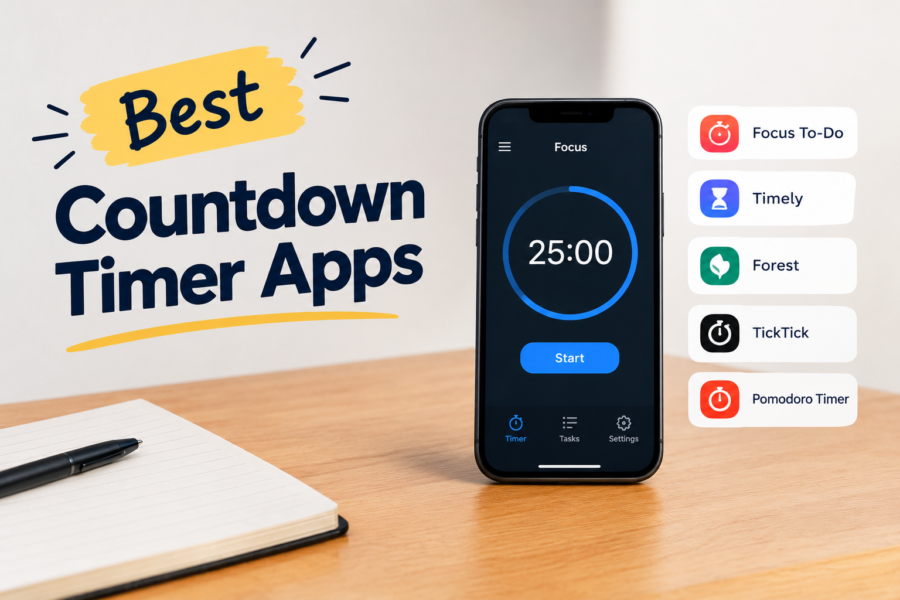
Time is limited, and countdown timer apps serve as a reminder of this. They:
- Make deadlines feel doable.
- Cut procrastination.
- Create helpful routines.
- And track our progress.
I’ve rounded up countdown timers for Windows, macOS, iPhone and Android, including browser-based options that work across devices.
These are the best countdown timer apps that 2026 has to offer.
Criteria We Used to Select the Apps
Not all timers are equal. Some are simple and straightforward, while others take it a notch higher with their smart features.
We used the following criteria to make this list practical and worthwhile.
1. Ease of Use
Chances are, you’ll use your timer regularly, if not every day. And if setting it up takes more than a couple of taps, you’ll likely abandon it before it helps you. For this reason, ease of use was our first priority.
A great timer makes timing effortless. You can start a session with a single tap and rely on its clean display to tell you exactly how much time you have left.
The controls are simple, and the alerts are clear. The timer should also continue running even when your phone is locked or when you switch to another app.
Clunky apps that demand sign-ups or stop working when your screen goes dark aren’t worth your time.
2. Design and Interface
Good design is more about clarity than flashy graphics. You want to avoid a cluttered design that makes something as simple as setting a timer feel like work.
The best apps will strike a balance between intuitive buttons and big, readable numbers that don’t leave you second-guessing. You shouldn’t have to squint to hunt for information. A glance should be enough to tell you how much time is left.
Bonus points if the app includes visual cues, such as color changes or progress rings, to make the countdown feel motivating.
3. Cross-Platform Availability
We no longer live on a single device, and your countdown timer shouldn’t either. A good app works seamlessly across different devices, allowing you to start a session on your laptop and check the remaining time on your phone.
Cross-platform availability also means syncing your presets and progress across all devices, regardless of where you log in. It’s a small feature, but an important one nonetheless. It makes the timer feel like part of your daily routine rather than a single-use app stuck on one device.
4. Reliability
The most frustrating timer is one that freezes mid-countdown or skips alerts. As such, reliability was non-negotiable in our selection. It is the backbone of a great countdown timer.
When you set a timer for a task or workout, you need to trust that it will notify you at the right moment, every time.
It should handle multitasking without breaking and survive phone lock screens. You can depend on it so that you forget about the app and focus on the task at hand.
5. Extra Features
When the basics aren’t enough, extra features elevate a timer from good to great. I’m talking about features like widgets for quick access, Pomodoro modes for productivity lovers and custom alarms to match your workflow.
While they aren’t essential for everyone, they can make a massive difference depending on your needs. Their beauty lies in the fact that they shape the timer into something that fits your lifestyle.
Best Countdown Timer Apps
For PC (Windows and macOS)
1. Hourglass
Hourglass is one of the simplest yet most effective countdown timers out there. It strips away unnecessary features and focuses on what matters the most: a reliable countdown.
It’s easy to set up, you simply enter your desired duration, for example, 25 minutes and the Hourglass starts counting down immediately.
What I Like:
With this app, you can run multiple timers simultaneously and even use color coding to make each one stand out. Plus, it stays tucked neatly in the background as you work.
What Could Improve:
Hourglass is a bare-bones app. It doesn’t come with extras like detailed reports or cross-platform syncing. It’s also available only to Windows, so Mac users will need to find alternative options.
Overall, if you spend long hours on your PC, Hourglass is an incredible way to keep tasks on track without having to reach for your phone.
2. SnapTimer
SnapTimer is a lightweight, no-frills countdown. While it doesn’t offer much, it focuses on being fast and incredibly easy to use. You can run it directly from a USB stick without installation, making it ideal for individuals who frequently switch between different PCs.
What I Like:
This app comes in a minimalist design. You get a clean and simple interface where you only need to type in the duration and hit start to get it running.
What Could Improve:
Its simplicity comes with limitations. You don’t get fancy designs, multiple timers or integration with other apps. It’s strictly a straightforward countdown timer.
3. TickCounter

If you prefer a timer that resides in your browser and can be accessed from any device, TickCounter is an excellent choice. It works online, which means you don’t need to download anything. Just access the site, set the countdown, and you are good to go.
What I Like:
TickCounter is versatile. You can set up simple countdowns as well as stopwatches and long-term event timers.
If you want to know how long you have till your next vacation or exam, TickCounter lays it out perfectly. There is also a sharing option, so you can send a link to family or friends.
What Could Improve:
Since it’s web-based, TickCounter doesn’t have an offline mode. You’ll be out of luck if you’re working somewhere without internet access.
Overall, if you need an accessible, shareable countdown rather than a hardcore productivity tool, TickCounter is a perfect choice.
4. TTClock
TTClock is a lightweight desktop timer and clock utility that adds convenient timekeeping tools to your Windows taskbar.
While it’s best known for enhancing the system clock, it also includes countdown timers, alarms and stopwatch functionality. This makes it a practical all-in-one option for everyday use.
What I Like:
TTClock is incredibly lightweight and doesn’t consume many system resources. You can set countdown timers and alarms in just a few clicks,
And because it lives in your taskbar, the app is within easy reach without interrupting your workflow.
I also appreciate the customization options, which let you tweak the clock display to suit your preferences.
What Could Improve:
The interface feels a little dated compared to modern timer apps, and first-time users may need a few minutes to familiarize themselves with its settings.
It also doesn’t offer cloud syncing or mobile versions, so it’s best suited for users who primarily work on a Windows PC.
5. As Timer
Something for Mac users. As Timer is a polished and professional countdown timer. It has a sleek design, yet it is incredibly easy to use. It’s perfect for managing time, timing meetings, or even cooking.
What I Like:
I love how clean and intuitive As Timer feels. Its interface is modern, and the numbers are big enough to read easily. You can also leave it running in the background without any worry.
Additionally, the app allows you to save and reuse your favorite timers, making it easier to manage repetitive tasks.
What Could Improve:
As Timer’s drawback is that it is Mac-only. As of the time of writing, there is no cross-platform syncing or a companion app for iPhone. Plus, given its simplicity, it doesn’t feature extras like productivity tracking.
For iPhone
6. Countdown by Sevenlogics
Looking forward to a big event like a birthday or wedding? Countdown by Sevenlogics is a fun way to track it. On top of showing you the days and hours left, the app adds custom backgrounds, music and photos to make each countdown personal.
What I Like:
I love how flexible the app is. You can count down multiple events simultaneously. It’s practical for looming project deadlines and exciting for events that you’re waiting on.
What Could Improve:
While it offers customization options, the best ones are available only through in-app purchases. This may feel limiting if you just want to keep things simple.
Still, Countdown is an exciting app that makes counting down enjoyable rather than stressful.
7. Countdown Star
Countdown Star brings about simplicity with a dash of style. It does its job reliably without overwhelming you with extras.
What I Like:
The app is highly customizable. You can choose different themes, display formats and even use it as a widget so your countdown is visible without opening the app.
What Could Improve:
Given its simplicity, Countdown doesn’t offer advanced features like progress reports or syncing across devices. It’s more of a ‘set it and forget it’ app than a productivity powerhouse.
For iPhone users who want a simple and straightforward countdown timer that looks good on their screen and requires little setup, this is an excellent choice.
8. Due
Due is popular for its persistence. Unlike other apps that ping you once and disappear, Due will keep reminding you till you either snooze it or mark the task as done. For the forgetful ones like us, this persistence can be a lifesaver.
What I Like:
The app’s interface is clean, which makes setting up a timer effortless. I especially like that it runs smoothly in the background and works offline, too.
What Could Improve:
If you don’t like to be nagged, you’ll find the persistence a bit annoying. And while it’s perfect for reminders, it doesn’t offer the same level of visuals and customization as other countdown apps.
9. Timer+
When one timer just isn’t enough, Timer+ comes in. This is a simple yet powerful countdown app that allows you to run multiple timers simultaneously. It feels a lot like a quiet assistant in your pocket.
You can have one timer track your workout circuit, another one keeping you on schedule for a work project, and a third one counting down the time until the pasta is ready.
What I Like:
I love Timer+ for its practicality. You can use and reuse each timer, meaning that if you repeat the same activities regularly, say a daily workout, you don’t have to set them up again.
Plus, its large and bold display makes it easy to glance over and instantly see the time left.
What Could Improve:
Timer+’s design leans more into function than style. As such, it doesn’t offer extra features like Pomodoro modes and progress reports. It’s also limited to iOS, so Android and PC users will have to look elsewhere.
Still, this is one of those apps that does what it promises, and does so reliably. If you need something simple and dependable that can run side by side without fuss, it’s definitely worth a try.
10. Minimalistic Countdown Timer
When you don’t want extra themes and a dozen menu options, the Minimalistic Countdown Timer is a good choice. The app offers a clean and distraction-free countdown. Simple as that.
What I Like:
The app’s design is sleek and stripped down. It ensures that your focus stays on the ticking time and not on flashy extras. It’s perfect if you want a timer you can set quickly for work, study or meditation.
What Could Improve:
Like most minimalist apps, this one doesn’t offer deep customization or multiple timers. It is designed for those who want the timer and nothing else. If you are a power user, you may want to look elsewhere.
For Android
11. Timebox Timer
Timebox Timer is a clean and practical countdown timer designed to help you stay focused without unnecessary distractions.
What I Like:
One of Timebox Timer’s biggest strengths is its simplicity. The interface is clean, with large, easy-to-read numbers and intuitive controls that let you start a timer in seconds.
It also supports multiple presets, making it convenient for activities you repeat regularly. The app continues running reliably in the background and provides clear notifications when time is up.
What Could Improve:
The app focuses on doing one job well, so it doesn’t include advanced productivity features like task management, detailed statistics, or cloud syncing.
While the design is modern, users looking for extensive customization may find the options somewhat limited.
12. Visual Timer
Watching numbers tick down is boring. The visual timer makes this fun with its bold and colorful progress circle, which shrinks as the countdown runs. It’s a simple concept, yet surprisingly effective for those of us who need a visual push to stay on track.
What I Like:
Visual Timer’s clarity is its selling point. You don’t have to read digits because the shrinking circle tells you everything you need to know. It’s also quick to set up and will run reliably in the background.
What Could Improve:
The app isn’t feature-heavy and doesn’t offer cross-platform syncing or progress reports. It is designed for one thing: to visually represent time, and it does so exceptionally well.
13. Time Until
You’ll appreciate this app if you are the type to anticipate milestones. It’s more than a basic countdown. It lets you track upcoming events with precision and a bit of flair.
What I Like:
Time Until stands out for its customization. You can set different units for your countdown, like days and hours, and even heartbeats if you want to get creative. You can also add widgets and choose different background themes.
All these add personality to what would otherwise be a dull clock. It may not be much, but it does an incredible job at making time feel exciting and motivating.
What Could Improve:
Everything in Time Until can feel a little busy if you are after pure minimalism. Additionally, advanced features such as extra widgets and themes are locked behind a premium version, which may not be appealing to everyone.
Even then, Time Until is a flexible option if you want to make your countdowns more personal.
14. Engross
Engross is more of a Pomodoro app than a countdown timer. It thrives on productivity sprints and combines timing with task management.
The app lets you add tasks, create sessions and track your productivity with detailed stats. This makes it perfect for those who are serious about how they spend their time.
What I Like:
Engross stands out for its blend of planner and timer. You control your schedule while staying consistent with focus intervals. And it also comes with a ‘distraction tracker’ that you tap whenever you lose focus. Over time, this gives you valuable insights into your habits.
What Could Improve:
Since it tries to do more than just timing, the app can feel a little overwhelming at first. Its interface is also not the sleekest, but it makes up for this with its depth and features.
If you are a productivity enthusiast looking to pair structure with accountability, I highly recommend Engross.
15. Multi Timer StopWatch
When you are juggling multiple tasks and one timer isn’t enough, Multi Timer StopWatch saves the day. This app allows you to run multiple timers simultaneously, making it incredibly useful when you are busy with various projects.
You can handle layered work projects, manage workouts and even cook multiple dishes, and it will have your back.
What I Like:
The app is very flexible. It allows you to customize sounds and label each timer. You even get to save timers for routines you repeat often.
Its interface is practical and easy to navigate, and you won’t have a problem switching between different countdowns.
What Could Improve:
The app’s design isn’t pretty, and it’s not the sleekest you’ll come across. Additionally, it’s only compatible with Android users.
Even though it’s not flashy, Multi Timer StopWatch is a workhorse and incredibly useful if you need to keep track of several things at once.
Make Every Second Count
We can’t get time back, and countdown timers are there to remind us of that. But we can make good use of the little we have. The right app will make the passing minutes feel more manageable and even motivating.
There is no one-size-fits-all app. Settle for one that fully meets your needs. It may take a few trials to find the right one, and that’s okay.