Remote work has its perks. But it’s easy to miscommunicate when everyone is not sharing an office. That’s why you need remote collaboration tools.
The right tools will make it easier for you and your team to communicate, manage projects, and keep everyone moving the same direction.
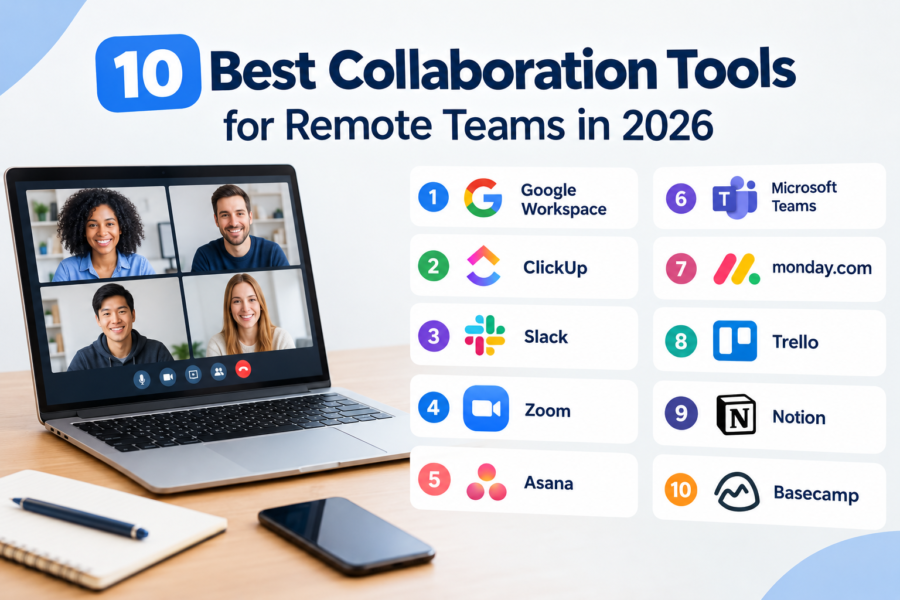
To save you the trouble, we’ve rounded up 10 of the best remote collaboration tools for teams in 2026.
1. Google Workspace
Best for: Real-time collaboration and communication
Pricing: Check Price
Google Workspace is for when you struggle with sending documents back and forth with names like final.docx and final-final.docx.
It brings together everyday tools like Gmail, Google Drive, Docs, Sheets, Slides, Meet, Chat, and Calendar in one ecosystem.
Google Calendar helps with scheduling meetings, Docs lets multiple people to work on the same file at the same time with changes saved automatically, while Google Meet is useful for video meetings, screen sharing, and team discussions.
Google Workspace brings a bunch of Google apps under one roof that easily work together.
Features
- Real-time collaboration in Docs, Sheets, and Slides.
- Google Meet is for video meetings and screen sharing.
- Google Chat is for one-on-one and group conversations.
- Shared calendars are for coordinating meetings and availability.
- You can and edit supported Google Docs, Sheets, and Slides files offline when offline access is enabled.
Why We Like It:
Google Workspace doesn’t try to reinvent work. Instead, it takes the tools that most people already use and makes them work together.
It’s hard to beat if you’re a remote team that needs a straightforward way to communicate and collaborate on documents.
One Thing to Consider:
You may need to pair Google Workspace with other dedicated project management tools if you want serious features like workload management and project tracking.
While it may be excellent at collaboration, it’s not designed to replace every other tool in your team’s stack.
2. ClickUp
Best for: All-in-one remote work management
Pricing: Check Price
ClickUp brings task management and collaboration in one place. You can use it to manage projects, create and assign tasks, communicate with teammates and automate repetitive work.
This makes it useful for remote teams that want more than basic communication. It keeps everyone clear on what’s happening, who’s doing it, and what needs to be done next.
Features
- Task and project management.
- Tracks goals and progress.
- Allows automation for repetitive tasks
- Real-time team chat
Why We Like It:
ClickUp can potentially replace several separate apps. For a remote team, having everything connected can save a lot of unnecessary tab-hopping.
One Thing to Consider:
ClickUp comes with a lot of features, which is great, but it can also make the platform feel overwhelming especially for first time users.
3. Slack
Best for: Team communication and day-to-day collaboration
Pricing: Check Price
Slack provides a dedicated platform to talk about work without the need for email threads. Teams can organize discussions into channels for specific departments, clients, or pretty much anything that deserves its own corner of the internet.
More than just chat, you can also send quick audio and video conversations and share files. Slack integrates with thousands of other tools, meaning you don’t have to live in completely separate apps.
Features
- Direct messages and group conversations.
- Organized channels for teams and projects.
- Integrations with other workplace apps.
- AI-powered summaries and search on supported plans.
Why We Like It:
Slack makes remote communication less fragmented. It gives each project or team its own home, instead of having them scattered across emails and personal messages.
One Thing to Consider:
Slack messages can easily become a time waster.
4. Zoom
Best for: Video meetings and virtual communication
Pricing: Check Price
Working from home means you’ll likely have a number of video meetings a week. Zoom is best known for video conferencing. But it’s also expanding beyond meetings to include chat, docs, scheduling, and other collaboration features.
It also has AI tools that can help to summarize notes and follow-up tasks.
Features
- HD video and audio meetings.
- Meeting chat and screen sharing.
- Calendar and scheduling integrations.
- AI-powered meeting summaries and notes.
Why We Like It:
Zoom makes the most from video conferencing. It gets people together and gives them the tools they need for a useful conversation. The newer AI and collaboration features also help complement this.
One Thing to Consider:
Constant video meetings can quickly become a work distraction. If something can be explained with a short message or screen recording, use that instead.
5. Asana
Best for: Managing remote team projects
Pricing: Check Price
Asana is built to prevent the ever constant question of ‘Who was supposed to do that?’ in large remote teams.
The platform gives you a shared space to organize projects, track progress, and see who is responsible for what.
It also allows you to view projects as a list, Gantt chart, Kanban board or calendar, depending on how you prefer to work.
Features
- Multiple project views, including List, Board, Calendar, Timeline, and Gantt.
- Integrations with other workplace tools.
- Task assignments, deadlines, and dependencies.
- Workflow automation.
Why We Like It:
With Asana, everything has a place, a deadline and an owner, which makes projects considerably easier to follow.
One Thing to Consider:
Asana is primarily a work and project management platform. It doesn’t replace the team’s messaging and video-conferencing tools. You may still need Zoom and other communication platforms alongside it.
6. Microsoft Teams
Best for: Meetings and collaboration for Microsoft 365 users.
Pricing: Check Price
Moving to Microsoft Teams isn’t exactly a difficult sell when your team already lives inside Microsoft 365.
It brings meetings and messaging into one workspace. You can create channels for different teams and projects, and connect other apps without jumping between different platforms.
You can use Teams for everything from quick one-on-one conversations to large meetings and ongoing project discussions.
Features
- Team and project channels.
- One-on-one and group messaging.
- Integration with Microsoft 365.
- File sharing and collaboration.
Why We Like It:
Teams becomes valuable when your team already uses Microsoft 365. You don’t need to add another communication platform to the pile. Instead, you get a central hub that connects every Microsoft app your team is already using.
One Thing to Consider:
A lot is going on in Microsoft Teams. While that is partly the point, it can be overwhelming. It may offer way more than you require if you’re only looking for basic meetings and communication.
7. monday.com
Best for: Visual project collaboration
Pricing: Check Price
monday.com stands out for its color-coded statuses and dashboards. It allows you to customize how information is organized and view the same work in different ways depending on what you’re trying to accomplish.
Communication is also connected to the work itself. Each item has an Updates section where you can discuss tasks and projects.
Features
- Task and project tracking.
- Multiple ways to visualize work.
- Dashboards and reporting.
- Team communication within projects.
Why We Like It:
monday.com gives teams room to build a workflow around how they work. You can shape the platform around the process rather than forcing your process into a rigid template.
One Thing to Consider:
Its flexibility can be a double-edged sword. It takes time to build a setup that works well. If you’re not careful, you may end up spending more time designing the board than actually using it.
8. Trello
Best for: Simple visual collaboration
Pricing: Check Price
Trello helps answer three questions: What needs to be done? What’s being worked on? And what’s finished?
The platform uses a card and board system based on the Kanban approach. You can create a board for a project, add lists for different stages of your workflow, and move cards between them as work progresses.
Features
- Visual Kanban-style boards.
- Built-in workflow automation.
- Task assignments and due dates.
- Comments and team collaboration.
Why We Like It:
Trello is refreshingly simple to use. Creating a board, adding a few lists, and moving cards isn’t difficult at all.
You don’t need to learn project management theory before you can start managing a project.
One Thing to Consider:
Its simplicity can easily become a limitation for complex projects. It may not offer the needed features for advanced reporting, detailed dependencies and complex project planning.
9. Notion
Best for: Team documentation
Pricing: Check Price
Notion is what happens when you have a collection of documents, spreadsheets and meeting notes and think, ‘What if we pull all of this in one place?’
The platform gives you a flexible workspace where you can create documents, wikis, meeting notes, and task systems. You can even link pages together, customize them and build an elaborate company knowledge base from a simple handbook.
You get a shared source of information that reduces the number of times someone has to answer the same question in Slack or email.
Features
- Meeting notes and shared documentation.
- Collaborative documents and pages.
- Integrations with other tools.
- Templates for common workflows.
Why We Like It:
Instead of letting useful information disappear into old chat and email threads, Notion allows you to build a central library that everyone can access and contribute to.
One Thing to Consider:
Given that there are endless ways to organize a workspace, you can spend an alarming amount of time trying to build the perfect system instead of actually working.
10. Basecamp
Best for: Straightforward project organization and team communication
Pricing: Check Price
Basecamp has a simple approach: put the important stuff in one place and stop making people hunt for it.
Instead of having different applications for tasks, project discussions and keeping track of what’s happening Basecamp brings everything together inside one platform.
This is useful for remote teams juggling multiple projects or clients. Each project gets its own space and makes it easier to separate files and conversations.
Features
- Dedicated spaces for individual projects.
- File and document sharing.
- Project updates and notifications.
- Schedules and project calendars.
Why We Like It:
Basecamp keeps everything simple and straightforward. It doesn’t try to make work even more complicated. This simplicity can be a major advantage for teams that want a central place for projects and communication.
One Thing to Consider:
Basecamp may not be the obvious choice for highly sophisticated project management features. For detailed resource planning or complex reporting, you may find platforms such as ClickUp more suitable.
How to Choose the Best Remote Collaboration Tool
Choosing the right remote collaboration tool isn’t going for the one with the longest feature list. You need to find one that fits how your team works.
Here are a few things worth considering before you sign everyone up for another account.
1. Your Team Size
A 10-person startup and a 100-person company would likely have different collaboration setups.
Small teams can manage with simpler tools. You may only need a place for team conversations, sharing documents, and basic task management.
Larger teams may need more sophisticated features like administrative controls, automation, and ways to organize multiple projects and departments.
The goal is to find a tool that meets your needs and gives your team enough room to grow.
2. Identify Your Collaboration Needs
Why do you need the software? Are you trying to improve communication or organize documents and information in one place?
Platforms like ClickUp and Asana are excellent for team communication while Notion and Google Workspace will put your documents in one place.
Identify the problem you’re trying to solve, then find a tool that solves it.
3. Check Integrations
The best software integrates with other tools for smoother operations. You may need Slack for communication, Zoom for meetings, and Google Drive for documents. Before signing up, check whether the tool integrates with the apps your team uses.
4. Consider Ease of Use
Teams already have a lot competing for their attention. The last thing they want is another in-depth guide on how to update a task.
When choosing a collaboration tool, pick one that feels reasonably intuitive from the start. Team members should be able to figure out the basics without constant help. It should be easy to find files, begin conversations, and update tasks.
5. Compare Pricing
Free is nice. But don’t choose a collaboration tool solely because it has a free plan. Free tiers often come with limits on features, users, and storage.
Look beyond the headline subscription fee when comparing prices. Check how much more you’ll pay as your team grows and whether you’ll need any additional software to fill any gaps.
Also, note what other tools the collaboration software could replace. If paying for it means getting rid of one or two other subscriptions, then the price may make more sense.
A Tool That You’ll Actually Use
You don’t need to subscribe to each and every collaboration tool. One or two is enough. The goal is to find the right platforms that fit naturally into the way your team works.
Remember, remote collaboration tools should make work easier, not give you another thing to manage.