

If you’re anything like me, you probably have a dozen things waiting for your attention.
There are emails to reply to, errands to run and long overdue projects. It’s exhausting, and you can’t seem to focus even when you want to.
Procrastination kicks in the moment you sit to work. You either find yourself working on something ‘urgent’ that doesn’t really matter or scrolling through social media.
This constant cycle of distraction is exactly what the Getting Things Done (GTD) technique was designed to fix. It will organize your thoughts and tasks so you can finally work without the nagging voice in the back of your mind.
Here’s all you need to know.
What Is Getting Things Done?
The Getting Things Done (GTD) productivity method can be traced to David Allen, an American author and productivity consultant.
He bases it on a simple idea: Your brain is a terrible place to store tasks.
When you try to recall everything you need to do, you end up stressed and worried about what you might be forgetting.
To fix this, he recommends taking everything out of your head and into a trusted system. So, instead of juggling loose thoughts, you break them down into doable and achievable steps.
It’s more like decluttering your mind. You organize your tasks so you can focus without the mental noise.
GTD is for you if you are a:
- Student balancing classes and personal commitments.
- Freelancer or entrepreneur who wears many hats and needs structure.
- Creative and professional who needs clarity to stay focused.
- Parent managing household tasks and work.
- Anyone prone to procrastination and easily distracted by social media.
5 Steps of Getting Things Done
How does the GTD work in practice? David Allen’s system is built around five steps. These steps will move you from feeling overwhelmed to being calm and in control.
1. Capture
The first step is to clear your head. As mentioned earlier, your brain is a terrible storage unit. It gets cluttered fast when you try to hold on to tasks and random thoughts.
Because of this, you should capture everything the moment it shows up. That could mean journaling it down or recording a quick voice note. The goal is to get it out of your head and into a trusted system.
With time, you stop relying on memory and in the process, free up mental space. You start to notice that you no longer worry about forgetting tasks because it’s all stored safely, ready for you to process later.
2. Clarify
Once you’ve captured that task or idea, the next step is to clarify what it means. Just because a task is on your list doesn’t mean you know what to do with it.
For example, ‘Work on the project’ could mean different things. Is it a work assignment or personal project?
Clarify whatever you’ve captured and break it into clear and actionable steps. Ask yourself:
- Is it something that I can act on?
- And if so, what is the next step?
- If not, should I delete it or save it for later?
The clarifying step turns raw notes into roadmaps. A messy list that would otherwise stress you becomes clear actions that tell you exactly what you need to do next.
3. Organize
Now that you have clarified your tasks, it’s time to organize them into the right slots. This is the part where you give each task a proper home so you don’t have to carry them in your head.
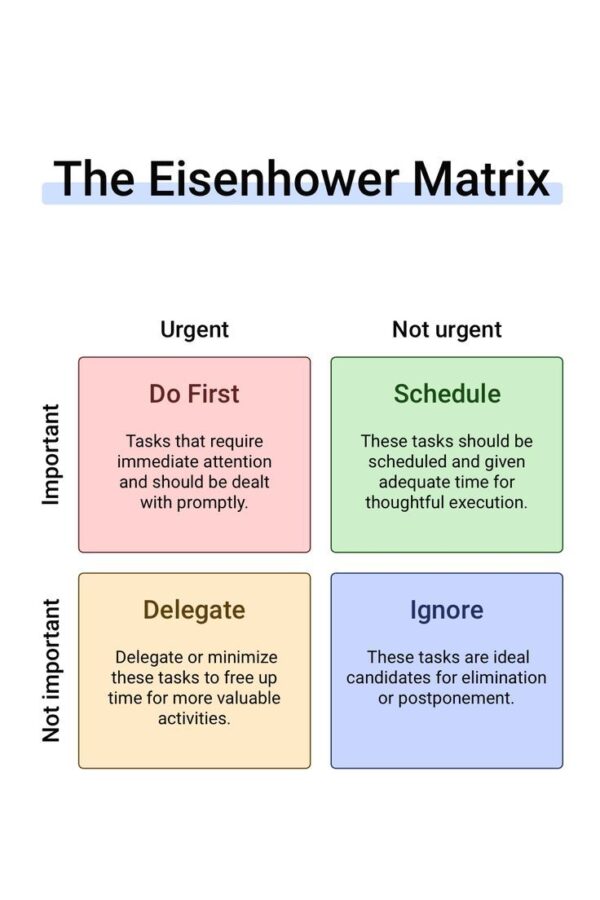
Sort out everything neatly. Use the Eisenhower Matrix to distinguish the urgent-important tasks from the non-urgent and non-important.
Quick actions like sending an email can go to a ‘Next Actions’ list while deadlines go on your calendar. Group projects with multiple steps on their own folder.
When you have everything sorted, you spend less energy trying to remember where things belong. Your trusted system holds all that for you.
4. Reflect
Most people slip up on this step. David Allen notes that if you don’t reflect, your system falls apart quickly. He recommends doing a weekly review of the system.
Take a step back and check your list. What have you accomplished and what is pending? What needs updating? Are there old and irrelevant tasks that need clearing out?
You can even do a shorter daily review. At the start or end of the day, check through your calendar to see what you need to accomplish on that or the next day.
By reflecting, you see the bigger picture and keep your system fresh.
5. Engage
The final step is about doing the work. At this point, you’ve already captured, clarified, organized and reviewed your calendar.
This means that you can act with confidence when you sit down to work. You are no longer scrambling or second-guessing. You cut the 30 minutes you used to spend deciding on what task to work on and do the actual work.
How to Engage: Models For Working

David Allen outlines three primary frameworks to guide you on your choices. When you sit down to engage, this is how to choose the correct item to work on.
1. Four-Criteria Model for Choosing Actions in the Moment
‘What should I do right now? Even with a well-organized system, you’ll still face this question occasionally. The Four-Criteria Model uses four filters to help you quickly decide on the next best action.
1. Context: What resources and environments are available to you at the moment? For instance, if you are at the office, you can make calls and answer emails, but you can’t mow the lawn.
2. Time Available: How much time do you have before the next commitment? If you can only spare 10 minutes, that might be a good time to send out a quick email or make a return call. A two-hour block, on the other hand, is enough time for deep work.
3. Energy Available: Some tasks demand sharp focus and creativity. And since your energy isn’t constant throughout the day, preserve these when you are fresh, most likely in the mornings.
4. Priority: Of all tasks that you can do, which is the most important? This is where your system pays off, so do this first.
2. Threefold Model for Identifying Daily Work
Not every task is the same. Some require your immediate attention while others you can push off to later. The threefold model sorts your daily work into three categories.
1. Doing Predefined Work. These are tasks you’ve already captured, clarified and organized into your system. They are structured work that you have planned for.
2. Doing work as it shows up. New things will pop up occasionally. Perhaps a client gives an urgent task or your boss moves up a project’s deadline. GTD acknowledges this and provides the flexibility to work on this without throwing your entire day off balance.
3. Defining your work. This is the time you spend to maintain your system. It could be processing your inbox or capturing new tasks and clarifying them. It is the meta-work that keeps everything else running smoothly.
3. Six-Level Model for Reviewing Your Own Work
The Six-Level Model zooms out the camera lens and lets you see both the big picture of your life and the tiny details. It has six levels with each level giving a different perspective.
Ground: These are things on your plate right now. They are tasks that you can do immediately.
Horizon 1: These are short-term projects that require more than one step. For example, plan a family vacation or launch a new website.
Horizon 2: These are the key areas that keep your work and life running; career, life, health, and finances among others. They ensure your projects support your broader responsibilities.
Horizon 3: These are medium-term goals, ones that you aim to accomplish in the next year or two.
Horizon 4: This is the bigger picture of where you want to be in the next few years. They include career direction and personal development.
Horizon 5: This is the highest view. It’s your ultimate purpose and the kind of life you want to live.
This model checks your work at each of these levels. You connect the small tasks of today to your long-term direction and ultimately your deeper purpose. It prevents you from getting stuck in busywork and forgetting why you’re doing it in the first place.
Benefits of the Getting Things Done Method
Beyond the steps and models, GTD delivers real and tangible benefits that can change the way you work and live. Here are the main ones.
1. Mental Clarity
A big win with GTD is that it frees up mental space. Your trusted system holds for you everything you need to remember. You clear out the mental clutter and focus on the task at hand.
2. Improves Focus
When you organize your tasks by context and priority, you don’t need to waste time deciding what to do. You sit down and get to work right away.
This focused way of working cuts down on distractions and procrastination and boosts productivity.
3. Reduces Stress
Loose ends can be stressful. Your brain leaks energy every time you think of an unaccomplished task.
GTD fixes this by capturing and clarifying everything. You no longer need to worry about tasks slipping through the cracks, which means you get less anxiety and more peace of mind.
4. Better Goal Alignment
GTD lets you review your work at different levels. It makes sure your daily actions tie back to your bigger goals. You capture and track commitments which helps you get the right things done.
Getting Things Done Mistakes to Avoid
Of course, no system is foolproof, even the mighty Getting Things Done. Many people make a few common mistakes and trip along the way.
The good thing is that these mistakes are easy to avoid once you know what to look out for.
1. Overcomplicating the Setup
A common mistake is making the GTD technique too complicated. You get excited about productivity apps and want to try out multiple tools. In the end, you spend too much time creating endless folders and color-coding everything instead of working.
The beauty of GTD is in its simplicity and flexibility. You can run it with a notebook or basic task app. The real power comes from consistency, not complexity.
When your setup starts to feel overwhelming, strip it back to the essentials.
2. Keeping Tasks in Your Head
Your brain is for problem-solving, not storage. The fastest way to break GTD is trying to remember everything.
Relying on memory creates a mental clutter and makes you constantly worried about what you are forgetting.
3. Confusing Capture with Organize
Capturing tasks is the first step, but not the only one. Your inbox becomes just another pile of chaos if you never clarify what those notes mean. The process only works when you process captured items into the right references.
4. Neglecting Regular Reviews
GTD heavily relies on regular reflection. You need to check in on projects periodically to clear your inbox and make sure everything is current. If you skip this, your system loses accuracy and makes you less likely to trust it.
Get it Done the Right Way
It takes discipline to build a habit, and you’ll most likely make mistakes along the way. But once you master the Getting Things Done technique, the payoff is massive. You get a calmer mind and the confidence that nothing important is slipping through.
That’s the power of getting things done– the right way.





Leave a comment