Keeping a project on track sounds simple on paper. In reality, it’s easy to miss tasks and let deadlines pile up.
That’s why it’s important to have project management software. The right tool will help you organize tasks, manage deadlines, collaborate with your team, and keep everything in one place.
But with so many options available, how do you choose the right one?
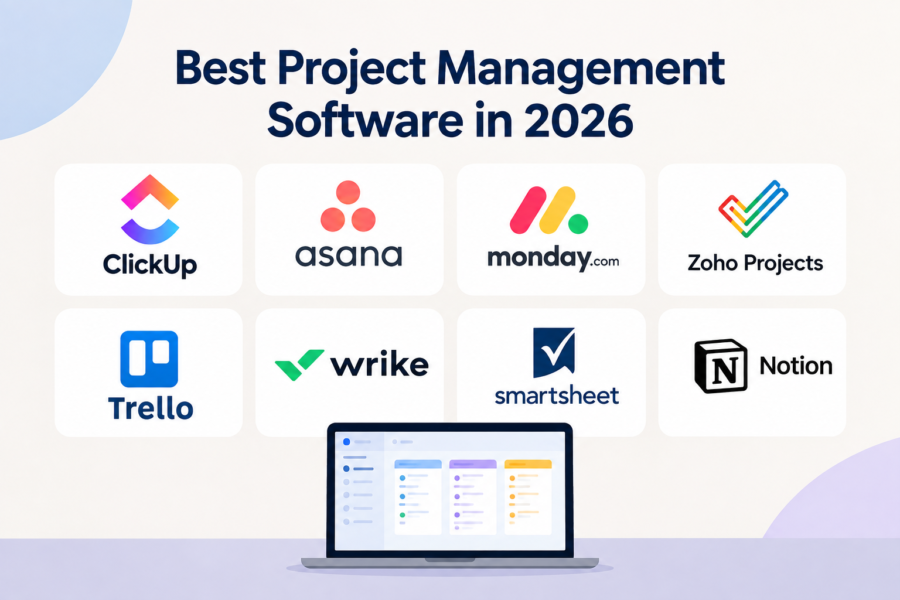
We’ve rounded up the best project management software in 2026 to help you find a tool that fits your team, workflow, and budget.
1. ClickUp
Best For: All-in-One Project Management Software
Pricing: Check Price
ClickUp is one of those project management tools that seems to have an answer for almost everything.
It’s for any team that wants to keep pretty much everything related to their work in one place. It allows you to create and assign tasks, track progress and collaborate on documents.
The platform is flexible and allows you multiple ways to organize and visualize your work.
Key Features
- Task hierarchies that break large projects into smaller tasks.
- ClickUp whiteboards allow teams to brainstorm ideas and visually map out projects.
- ClickUp goals connect everyday tasks with broader team objectives.
- Built-in AI automates repetitive workflow to speed up everyday work.
What We Like
ClickUp’s biggest strength is how much you can do without leaving the platform. It gives you customization options to adapt to different types of projects, instead of forcing your team into one way of working.
What Could Be Better
The numerous features and customization options can make it feel a little bloated, especially for new users. ClickUp may be slightly complicated if you’re only looking for a simple project management tool.
2. Asana
Best For: Team Collaboration
Pricing: Check Price
Asana makes it easier for teams to organize their work and keeps everyone moving in the same direction. It allows users to assign tasks, set deadlines, and track progress.
Key Features
- You can set project milestones to highlight important deadlines and achievements.
- Use Portfolios to monitor multiple projects and get a broader view of your team’s workload.
- Create task dependencies to show which pieces of work need to be completed before others can begin.
What We Like
Asana’s interface is clean and simple. It doesn’t take much effort to understand the basics.
It’s also flexible enough to handle everything from a small team project to more complex workflows involving multiple departments.
What Could Be Better
Asana is pricey, and it can quickly become expensive for larger teams that need its more advanced features. Most of its useful features are reserved for higher-tier plans.
3. monday.com
Best For: Visual Project Management
Pricing: Check Price
monday.com is a solid choice if you’d like to see your entire project laid out in front of you. It’s colorful and the visual boards give teams a quick way to know who’s working on what without having to dig through layers of menus.
Key Features
- Create visual dashboards that combine information from multiple boards in one place.
- Build highly customizable workspaces using columns.
- Use WorkCanvas to brainstorm, map processes, and collaborate visually.
What We Like
The platform’s biggest selling point is probably its visual approach. It’s highly customizable and teams can build workflows around how they work without having to completely change their existing processes.
You can look at a board and get a fairly good idea of what’s happening without opening every individual task.
What Could Be Better
With so many options to configure, it may take some time to set up everything exactly how you want.
The pricing can also be a bit difficult to compare since features and user requirements vary between plans.
4. Zoho Projects
Best For: Budget-Friendly Option
Pricing: Check Price
Zoho is an excellent choice if you’re looking for an affordable way to keep your team organized.
It gives businesses the core tools they need to manage projects without making the software itself another major expense.
Key Features
- Break projects into milestones, task lists, tasks, and subtasks.
- Track billable and non-billable hours with built-in timesheets.
- Connect projects with other Zoho applications for a more integrated business workflow.
What We Like
Zoho makes its case when it comes to value. You get a solid project management tool without putting too much pressure on your budget. It works particularly well for businesses already using other Zoho applications.
What Could Be Better
Zoho isn’t as polished as some of the better-known tools. It may take some time for new users to get comfortable with the interface, especially when working with advanced features.
5. Trello
Best For: Simple Project Management
Pricing: Check Price
Trello keeps project management simple. Its board-and-card system lets you see what needs to be done and what’s already finished without having to navigate a complicated system.
Such simplicity can be a major advantage for individuals and small teams.
Key Features
- Organize work with Kanban-style boards.
- Create custom card templates for tasks or projects that your team handles regularly.
- Add checklists, labels, attachments, comments, and due dates directly to individual cards.
What We Like
Trello allows you to get started very quickly. Its Kanban-style layout is easy to understand, even for someone who’s new to project management.
It’s also flexible and allows you to manage content calendars, personal tasks, or pretty much anything that can be broken down into stages.
What Could Be Better
Trello’s simplicity becomes a limitation when projects get complicated. You may need something more powerful if your team manages highly detailed workflows.
6. Wrike
Best For: Enterprise Teams
Pricing: Check Price
Wrike becomes a solid option when your team has outgrown basic task management and needs more control over complex projects and workloads.
It combines project planning, collaboration, reporting, and workflow automation into one platform. This makes it useful for multiple teams and projects that need to work together.
Key Features
- Use cross-tagging to connect tasks and projects across different teams.
- Use workload charts to visualize team capacity and identify resource bottlenecks.
- Track project performance through customizable analytics and reports.
What We Like
Wrike gives larger teams more control. Managers get a broader view of projects while team members can focus on their assigned tasks.
The platform also provides plenty of customization so different departments can build workflows that suit their specific needs.
What Could Be Better
All these features can feel overwhelming if you’re only looking for a simple tool. Also, setting up workflows and getting everyone comfortable with the platform can take time and training.
7. Smartsheet
Best For: Spreadsheet-Style Project Management
Pricing: Check Price
Smartsheet is for when your team relies heavily on spreadsheets but wants something built specifically for project management.
It keeps the grid-based layout many people already understand while adding project planning, reporting, and other resource management capabilities.
Key Features
- Use spreadsheet-style grids to manage projects.
- Create automated workflows that notify members or update tasks when information changes.
- Build interactive dashboards that pull information from multiple sheets and projects.
What We Like
Smartsheet’s interface makes it approachable for teams that already use Google Sheets and Excel. But it goes further by adding project dependencies, dashboards, and resource management.
What Could Be Better
Smartsheets can take time to master. It can also become expensive for larger teams that depend on the features and number of users required.
8. Notion
Best For: Projects and Documentation
Pricing: Check Price
Notion sits somewhere between a project management tool, a note-taking app, and a team wiki. It’s this combination that makes it useful. It allows you to bring all company information, including notes, documents, and project information, into the same workspace.
Key Features
- Turn any page into a customizable workspace using blocks and tables.
- Use synced blocks to update the same piece of information across multiple pages.
- Create team wikis that keep company knowledge, processes, and project documentation in one place.
What We Like
Notion is flexible. It doesn’t lock you in a particular structure but allows you to build your workspace around how your team works.
Also, having project information and documentation in the same place becomes convenient.
What Could Be Better
Notion can feel a bit overwhelming when you’re starting from scratch. Figuring out the best setup can take time.
Also, given that it’s not a traditional project management tool, teams will require advanced resource planning so as not to limit their workflow.
Pick the Right Tool
The best project management software isn’t necessarily the one with the longest feature list. It’s the one that makes your team’s work easier to organize.
Take a look at how your team actually works before choosing. The right software should solve problems, not give you a whole new set of them.